WELCOME TO GTU MATERIAL

GTU MATERIAL PROVIDE YOU ALL TYPE OF EDUCATION MATERIAL | DOWNLOAD FREE MATERIAL | ALL TYPE OF EDUCATION SOFTWARES | EXAM ALERTS | EBOOKS | EXAM PAPERS | TIME TABLE | ALL TYPE OF SYLLABUS | MBA | MCA | ENGINEERING | BE | FREE MATERIAL PROVEDE

SHARE YOUR MATERIAL ALSO.. PLEASE SEND ME YOUR MATERIAL WHO SHARE WITH PEOPLE WE PUBLISH IN GTU MATERIAL WITH YOU NAME.. PLEASE SEND US YOUR NAME, COLLEGE NAME, AND STREAM SO THAT WE CAN PUBLISH WITH YOUR NAME..

THANKS YOU SO MUCH.....

Friday, 18 February 2011

GTU C PROGRAM | SELECTION SORT PROGRAME

C.........

/* select.c */
/* selection sort */
#include <stdio.h>
#include <stdlib.h>
void selection_sort(int array[], int size)
{
 int temp, current, j;
 for (current = 0; current < size; current++)
  for (j = current + 1; j < size; j++)
   if (array[current] > array[j])
   {
    temp = array[current];
    array[current] = array[j];
    array[j] = temp;
   }
}
void main(void)
{
 int values[30], i;
 clrscr();
 printf("\n Unsorted list is as follows \n");
 for (i = 0; i < 30; i++)
 {
  values[i] = rand() % 100;
  printf(" %d", rand() %100);
 }
 selection_sort(values, 30);
 printf("\n Sorted list is as follows \n");
 for (i = 0; i < 30; i++)
 printf("%d ", values[i]);
 getch();
}

----------------------------------------------------------------------------
C++.........

// SELECTION SORT
# include<iostream.h>
#include <stdio.h>
#include <stdlib.h>
 class selection
      {
       private:
  int temp, current, j;
       public:
  void selection_sort(int *, int);
  void display(int *, int );
 };
   void selection :: selection_sort(int array[], int size)
   {
   for (current = 0; current < size; current++)
    for (j = current + 1; j < size; j++)
      if (array[current] > array[j])
 {
   temp = array[current];
   array[current] = array[j];
   array[j] = temp;
 }
  }
     void selection :: display( int list[], int n)
       {
   cout<<"\n Sorted list is as follows :\n";
   for(int i = 0 ; i < n ; i++)
      {
        cout<<"  "<<list[i];
      }
 }
void main(void)
 {
   selection sort;
   int list[30];
   int number;
   cout<<"\n Input the number of the elements:";
   cin>>number;
   for (int i = 0; i < number; i++)
      {
 cout<<"\n Input the values for | "<<i+1<<" | ";
 cin>>list[i];
      }
       sort.selection_sort(list, number);
       sort.display(list, number);
    }

Thursday, 17 February 2011

Network Securiety

1)Explain public key cryptography and hash algorithm
2)What abut data encryption standard
3)Expaoin in detail about internationaldata encryption algorithem
4)disuss ticket in kdc, certification in ca, session key establishment&delegation
5)Explain security service for Electronic mail?

Input and Output

Input and Output:

FILE *fopen(const char *filename, const char *mode)
FILE *freopen(const char *filename, const char *mode, FILE *stream)
int fflush(FILE *stream)
int fclose(FILE *stream)
int remove(const char *filename)
int rename(const char *oldname, const char *newname)
FILE *tmpfile(void)
char *tmpnam(char s[L_tmpnam])
int setvbuf(FILE *stream, char *buf, int mode, size_t size)
void setbuf(FILE *stream, char *buf)
int fprint(FILE *stream, const char *format, ...)
int sprintf(char *s, const char *format, ...)
vprintf(const char *format, va_list arg)
vfprintf(FILE *stream, const char *format, va_list arg)
vsprintf(char *s, const char *format, va_list arg)
int fscanf(FILE *stream, const char *format, ...)
int scanf(const char *format, ...)
int sscanf(char *s, const char *format, ...)
int fgetc(FILE *stream)
char *fgets(char *s, int n, FILE *stream)
int fputc(int c, FILE *stream)
int fputs(const char *s, FILE *stream)
int getc(FILE *stream)
int getchar(void)
char *gets(char *s)
int putc(int c, FILE *stream)
int putchar(int c)
int ungetc(int c, FILE *stream)
size_t fread(void *ptr, size_t size, size_t nobj, FILE *stream)
size_t fwrite(const void *ptr, size_t size, size_t nobj, FILE *stream)
int fseek(FILE *stream, long offset, int orogin)
long ftell(FILE *stream)
void rewind(FILE *stream)
int fgetpos(FILE *stream, fpos_t *ptr)
int fsetpos(FILE *stream, const fpos_t *ptr)
void clearerr(FILE *stream)
int feof(FILE *stream)
int ferror(FILE *stream)

String Functions

String Functions:

char *strcpy(s , ct)
char *strncpy(s , ct , n)
char *strcat(s , ct)
char *strncat(s , ct , n)
int strcmp(cs , ct)
int strncmp(cs , ct ,n)
char *strchr(cs , c)
char *strrchr(cs , c)
size_t strspn(cs , ct)
size_t strcspn(cs , ct)
char *strstr(cs , ct)
size_t strlen(cs)
char *strerror(n)

Character Class Tests

Character Class Tests:

isalnum(c)
isalpha(c)
iscntrl(c)
isdigit(c)
isgraph(c)
islower(c)
isprint(c)
ispunct(c)
isspace(c)
isupper(c)

Utility Functions

Utility Functions:

double atof(const char *s)
int atoi(const char *s
long atol(const char *s)
double strrod(const char *s, char **endp)
long strtol(const char *s, char **endp, int base)
unsigned long strtoul(const char *s, char **endp, int base)
int rand(void)
void srand(unsigned int seed)
void *calloc(size_t nobj, size_t size)
void *malloc(size_t size)
void *realloc(void *p, size_t size)
void free(void *p)
void abort(void)
void exit(int status)
int atexit(void (*fcn)(void))
int system(const char *s)
char *getenv(const char *name)
void *bsearch(const void *key, const void *base, size_t n, size_t size, int (*cmp)(const void *keyval, const void *datum))
void qsort(void *base, size_t n, size_t size, int (*cmp)(const void *, const void *))
int abs(int n)
long labs(long n)
div_t div(int num, int denom)

Mathematical Functions

Mathematical Functions:

sin(x)
cos(x)
tan(x)
asin(x)
acos(x)
atan(x)
atan2(x)
sinh(x)
cosh(x)
tanh(x)
exp(x)
log(x)
log10(x)
pow(x,y)
sqrt(x)
ceil(x)
floor(x)
fabs(x)
ldexp(x)
frexp(x,double *ip)
modf(x,double *ip)

Data and Time Functions

Data and Time Functions:

clock_t clock(void)
time_t time(time_t , *tp
double difftime(time_t time2 , time_t time1)
time_t mktime(struct tm *tp)
char *asctime(const time_t *tp)
char *ctime(const time_t *tp)
struct tm *gmtime(const time_t *tp)
struct tm *localtime(const time_t *tp)

Defferred Update method

Deferred update
  • Do not physically update the database on disk until after a transaction reaches its commit point;
  • Then updates are recorded persistently in the log and the written to the database.
  • Before reaching commit point, the transaction updates are recorded in the local transaction workspace (buffers)
  • During commit, the updates are first recorded persistently in log and then write to the database.
Transaction fail
o If transaction fails before reaching commit point, it will not have changed the database. (no need undo)
o It may necessary to REDO the effect of the operations of a committed transaction from the log, because their effect may not yet have been recorded.
  • Deferred update is known as “NO-UNDO/REDO Algorithm
Recovery based on deferred update
This technique postpone any actual update to the database until the transaction complete and reached check point.
During transaction execute
o Updates are recorded in log file and in cache buffer.
o After transaction reaches it commit point and the log file is forced to write to disk, the update are record to database.
Fail before commit,
no need undo.
Simplify recovery,
  • Can not use in practice because unless transaction are short and each transaction change few times.
  • May running out of buffer space because transaction change must be held in buffer until commit.
State
  • A transaction can not change the database on disk until it reaches it commit point.
  • A transaction does not reach its commit point until all its update operations are recorded in the log and the log is force written to disk.

Example of Deferred Update

Example


Example :

Log Based Recovery

  • The most widely used structure for recording database modification is the log.
  • The log is a sequence of log records, recording all the update activities in the database.
  • In short Transaction log is a journal, which contains history of all transaction performed.
  • Log contains Start of transaction, trans-id, record-id, type of operation (insert, update, delete), old value, new value, End of transaction that is commit or aborted.

Techniques for recovery
Log Based Crash Recovery
o Deferred update
Complete -> update
o Immediate update
Change -> update
o Checkpoints
Shadow Paging

Immediate Update Method

Immediate Update Method

Immediate update technique
  • Database may be updated by some operations of a transaction before the transaction reaches its commit point.
  • These operations are typically recorded in the log on disk by force writing before applied
    Transaction fail
    If a transaction fail after recording some change to the database, but before commit point, the effect of its operations on the database must be undone (transaction must be rollback)
    Need both undo and redo in recovery
    Immediate update is known as “UNDO/REDO Algorithm”to the database.
If fail occurs,
The executing (active) transaction at the time of failure may have recorded some Changes in the database.
The effect must be undone
Example

Example

Example :

Checkpoints

Checkpoints
When System failure occurs
o We must consult log to determine those transaction that need to be redone and those transaction that need to be undone.
o We need to search entire log to determine this information.
There are two major difficulties with this
o Search process is time consuming
o Most of transaction that need to be redone have already written their update into the database. Although redoing them will cause no harm.
  • To reduce this type of overhead, we introduced checkpoints.
  • During execution system maintains the log, using one of the two techniques Deferred update or Immediate update.
  • In addition, System periodically performs checkpoints, which requires following sequence of action to take place
  • Output onto stable storage all log records currently residing in main memory.
  • Output to the disk all modified buffer blocks
  • Output onto stable storage a log record.
  • Transactions are not allowed to perform any update actions such as
    • Writing to a buffer block or
    • Writing to log record
While a checkpoint is in progress.
  • Checkpoint can be occur automatically and manually.
  • Checkpoints continue to occur whenever the database is shut down (normal or immediate) or when a redo log switch occurs.
  • To force a checkpoint, issue the following SQL command:
o alter system switch logfile;
o Alter system checkpoint;
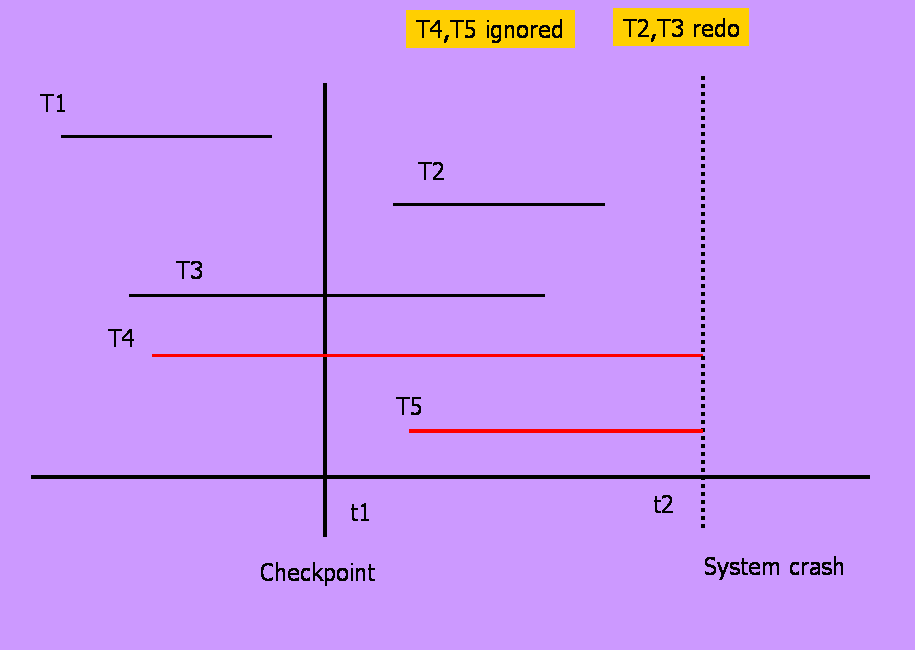
Example :


  • T1 can be ignored (updates already output to disk due to checkpoint)
  • T2 and T3 redone.
T4 undone

Shadow Paging

This technique does not require LOG in single user environment
  • In multi-user may need LOG for concurrency control method
  • Shadow paging considers
    • The database is partitioned into fixed-length blocks referred to as PAGES.
    • Page table has n entries – one for each database page.
    • Each contain pointer to a page on disk (1 to 1st page on database and so on…).
The idea is to maintain 2 pages tables during the life of transaction.
    • The current page table
    • The shadow page table
When transaction starts, both page tables are identical
    • The shadow page table is never changed over the duration of the transaction.
    • The current page table may be changed when a transaction performs a write operation.
    • All input and output operations use the current page table to locate database pages on disk.
Advantages

  • No Overhead for writing log records.
  • No Undo /  No Redo algorithm.
  • Recovery is faster.
Disadvantages
  • Data gets fragmented  or scattered.
  • After every transaction completion database pages containing old version of modified data need to be garbage collected.
  • Hard to extend algorithm to allow transaction to run concurrently.

INFORMATION SYSTMES CONTROL AND AUDIT

THIS QUESTIONS PAPER IS FOR 2008-2009 BATCH 5 TH SEMESTER

ANSWER ANY 5 QUESTIONS OF THE FOLLOWING FIST QUESTIONS IS COMPULSORY.

1)
A.EXPLAIN INFORMATION SYSTEM CONTROLS.
B.DESCRIBE PUBLIC-KEY CRYPTOSYSTEM.
C.DESCRIBE DATA PROCESSING SYSTEM.
D.EXPLAIN SAFEGUARDING.
E.EXPLAIN THE CHARACTERISTICS OF AUDIT SOFTWARE.

2)
GIVE AN OVERVIEW OF INFORMATION SYSTEMS AUDITING.

3)DISCUSS SYSTEM DEVELOPMENT MANAGEMENT CONTROLS.

4)DESCRIBE THE COMPONENTS OF INTERNAL CONTROL THAT SHOULD BE ESTABLISHED IN AN ORGANIZATION.

5)EXPLAIN PROCESSING CONTROLS.

6)DESCRIBE EXPERT SYSTEMS ARCHITECTURE WITH A BLOCK EVALUATION PROCESS.

7)GIVE OVERVIEW OF THE EFFECTIVENESS OF SYSTEM EVALUATION PROCESS.

8)WHAT PURPOSE MIGHT AUDITORS SEEK TO ACHIEVE IN USING GENERALIZED AUDIT SOFTWARE TO EXAMINE THE QUALITY OF DATA MAINTAINED ON AN APPLICATION SYSTEM FILES?

Friday, 11 February 2011

How to run java program


Step :
1. Download JDK (Java Development kit) ((Download)) and install it ..
2. Now go C:\Program Files\Java\jdk1.6.0_17\bin is it right then copy this path.
3.Open my computer properties > Advance tab > Environment variables >
4.Double click on path

5.in variable value: make ";" semi colon and paste the copied path and again do semi colon  ";"
6.ok.
7.for conformation open cmd (command prompt) and type "javac"
8. Now your java successfully install ..
9. How to run.. so go this link copy any program in your notepad and save it same name as class name which contain main function..
10. open cmd and go path where you save program .
11. type javac progName.java (for compile the program) and then type java progName (for run that prog.)

HTML Basic Tags Examples, html tags


1.      A very simple HTML document
2.      Text inside paragraph (Demonstrate <p> with its attributes, <br> and <hr>)
3.      Demonstrate All header tags (<h1> to <h6>)
4.      Demonstrate All text formatting tags (<b>,<u>,<i><tt>,<strike>,<sub>,<sup>,<big>,<strong>,<small>)
5.      Demonstrate <font> with all its attributes.
6.      Demonstrate <a> tag for creating hyperlink with external document.
7.      Demonstrate <a> tag for creating bookmark.
8.      Demonstrate creating Ordered List with help of <ol> and <li> tags.
9.      Demonstrate creating Unordered List with help of <ul> and <li> tags.
10.  Demonstrate creating Definition List with help of <dl>,<dt>,<dd> tags.
11.  Explain creating table of size 4 x 4. (USE <table>,<tr>,<td>,<th> and <caption> tags)
12.  Demonstrate Rowsapn & Colspan attribute of <table> .
13.  Demonstrate Cell padding and Cell spacing attribute of <table> with example.
14.  Demonstrate inserting image in webpage. (use <img> tag)
15.  Demonstrate creating horizontal frames of equal size. (use <frameset> and <frame> tag.
16.  Demonstrate creating vertical frames of equal size. (use <frameset> and <frame> tag.

Wednesday, 9 February 2011

Assignment - 1 FON General Terms


Subject                : Fundamentals of Networking (FON)
Subject Code      : 640001
Department         : MCA
Assignment Date : 24th Jan, 2011
Submission Date : 31st Jan, 2011

Assignment – I

Q-1. Define following Terms.

(a) Computer Network
(b) Distributed System
(c) Server
(d) Client
(e) Protocol
(f) Unicasting
(g) Multicasting
(h) Broadcasting
(i) Point-to-Point Network
(j) Packet
(k) LAN
(l)  MAN
(m) WAN
(n) Internetworks
(o) Gateway
(p) Router
(q) Hub
(r) Switch
(s) Frame
(t) TCP
(u) UDP
(v) OSI Layers
(w) TCP/IP Layers
(x) Different LAN Topologies
(y) Ethernet

Tuesday, 8 February 2011

UNIX / LINUX COMMAND

Twitter Delicious Facebook Digg Stumbleupon Favorites More

 
Design by Free WordPress Themes | Bloggerized by Lasantha - Premium Blogger Themes | Grants For Single Moms